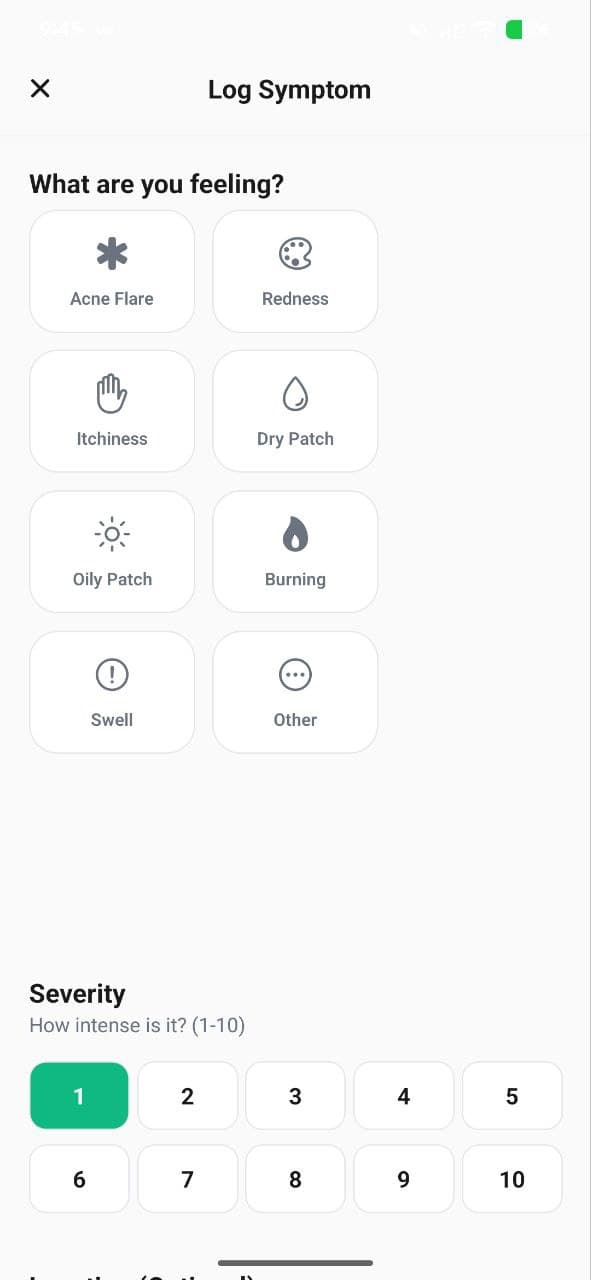
Use the Symptom Diary to log skin changes, irritations, or breakouts with severity levels. Track patterns over time to understand your skin triggers.
While AI scans give you objective data about your skin, the Symptom Diary adds the personal context that makes the data meaningful. By logging how your skin feels and what's happening in your life, you can identify patterns and triggers that no scan alone can detect.
What to Log
The Symptom Diary lets you record:
- Symptom type — dryness, irritation, breakout, redness, itching, burning, peeling, and more
- Severity level — rate each symptom from mild to severe
- Affected areas — specify which parts of your face are affected
- Notes — add context like diet changes, stress levels, product changes, or environmental factors
When to Log
The best practice is to log symptoms:
- When you notice any change (good or bad) in your skin
- After trying a new product for the first time
- When you experience a breakout or reaction
- When environmental factors change (weather, travel, etc.)
Identifying Patterns
Over time, your diary entries create a timeline that correlates with your scan scores. This helps you:
- Identify triggers — "Every time I eat dairy, I break out 2 days later"
- Product reactions — "My redness score spiked the week I started using that new toner"
- Seasonal patterns — "My hydration drops every winter"
- Stress correlation — "Breakouts always follow stressful work weeks"
Sharing with Your Dermatologist
Your symptom diary and scan history together create a comprehensive skin health record. You can generate a shareable Skin Report Card that includes diary highlights alongside scan trends — perfect for dermatologist appointments.
Weekly Reports
AISkincare compiles your diary entries and scan data into Weekly Summary reports, automatically highlighting unusual patterns or significant changes. This saves you from manually reviewing days of data.
Track Your Skin Metrics with AISkincare
Put this guide into practice. Get a 3-second clinical AI scan, build your custom AM/PM routine, and see measurable improvements.


BingoLabs Dermatology & AI Research Team
We build intelligent mobile healthcare and computer-vision algorithms dedicated to empowering personal skin health through science and habit consistency.
FAQ
Questions about this guide
What should I do after “Symptom Diary: Log & Track Skin Changes Daily”?
Use the Symptom Diary to log skin changes, irritations, or breakouts with severity levels. Track patterns over time to understand your skin triggers. If you want that advice checked against your own skin, take a scan and compare it after a few weeks of one change, not five.
Does this article diagnose a condition?
No. “Symptom Diary: Log & Track Skin Changes Daily” is a cosmetic guide from the AISkincare team. Pain, a spreading rash, or a mark that is changing needs a clinician.
Where do the six scores mentioned here come from?
A selfie in the AISkincare app. The scan scores hydration, texture, tone, acne, pores, and redness. This article does not run that scan.
AISkincare for iOS and Android
Put this guide next to a scan you can reopen.
App Features advice is easier to judge when hydration, texture, or redness has a number. AISkincare stores that number. This page does not.
Keep going