Our scan comparison feature lets you see side-by-side how your skin has improved. Learn how to track hydration, texture, and more over weeks.
Consistency is the secret to great skin, and AISkincare's Progress Tracking and Scan Comparison features help you see exactly how your skin is improving over time.
The Progress Dashboard
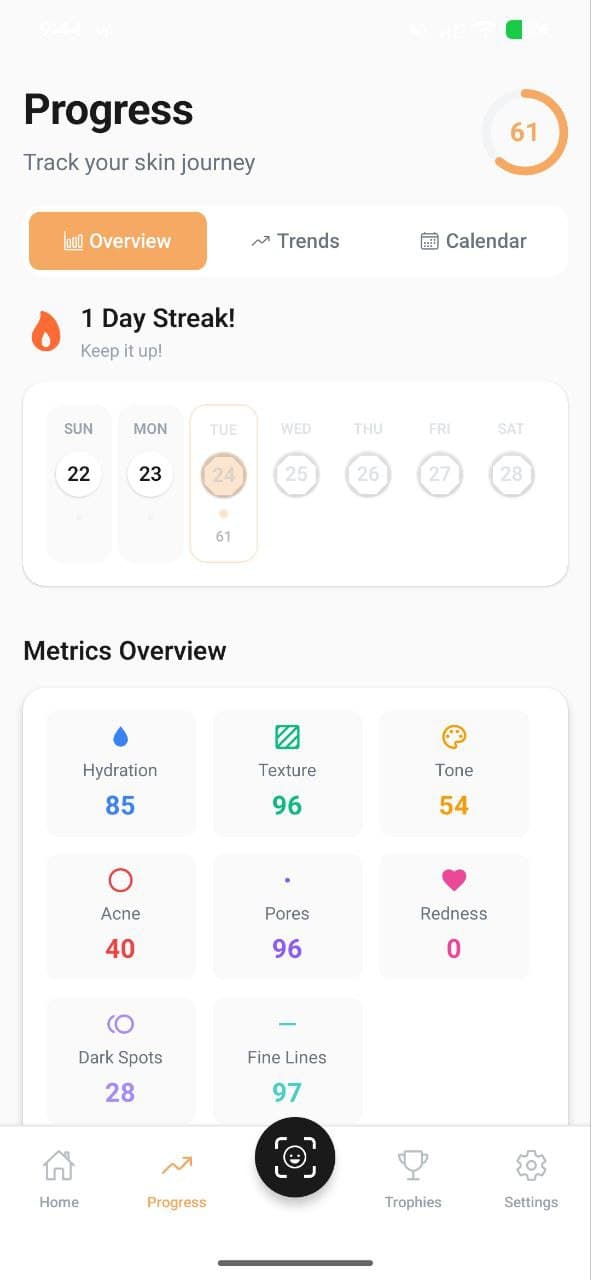
Your Progress tab shows a visual overview of all six skin metrics over time. You can view trends by week, month, or all-time to see how each metric has changed.
The dashboard includes:
- Overall Skin Score — a combined score across all metrics
- Individual metric charts — see hydration, texture, tone, acne, pores, and redness trends
- Weekly averages — smoothed data to show real trends (not just daily fluctuations)
Scan Comparison
The Compare Scans feature lets you select two scans from different dates and view them side-by-side. This is incredibly useful for:
- Seeing visible improvements in texture or redness
- Checking whether a new product is helping or hurting
- Sharing progress with your dermatologist
Weekly Scan Calendar
Your home screen's scan calendar shows which days you've scanned, helping you stay consistent. Each day shows your scan score with color-coded indicators (green for good, yellow for average, red for areas needing attention).
Tips for Meaningful Progress Tracking
- Scan at the same time each day — morning scans before products give the most consistent baseline
- Wait at least 2 weeks before judging a new product's effectiveness
- Log symptoms in your Diary when something changes — this helps correlate events with metric changes
- Check your weekly reports for AI-generated insights about your progress
Track Your Skin Metrics with AISkincare
Put this guide into practice. Get a 3-second clinical AI scan, build your custom AM/PM routine, and see measurable improvements.


BingoLabs Dermatology & AI Research Team
We build intelligent mobile healthcare and computer-vision algorithms dedicated to empowering personal skin health through science and habit consistency.
FAQ
Questions about this guide
What should I do after “Track Your Skin Progress: Compare Scans Over Time”?
Our scan comparison feature lets you see side-by-side how your skin has improved. Learn how to track hydration, texture, and more over weeks. If you want that advice checked against your own skin, take a scan and compare it after a few weeks of one change, not five.
Does this article diagnose a condition?
No. “Track Your Skin Progress: Compare Scans Over Time” is a cosmetic guide from the AISkincare team. Pain, a spreading rash, or a mark that is changing needs a clinician.
Where do the six scores mentioned here come from?
A selfie in the AISkincare app. The scan scores hydration, texture, tone, acne, pores, and redness. This article does not run that scan.
AISkincare for iOS and Android
Put this guide next to a scan you can reopen.
App Features advice is easier to judge when hydration, texture, or redness has a number. AISkincare stores that number. This page does not.
Keep going